Chapter 5: Starting Your Research

Introduction

Much of the writing you will do as a college student requires finding, selecting, analyzing, and using sources. These might be published and available online or in print. In other contexts you will be asked to conduct original research or primary investigations through experiment, interviews, and survey data. In other words, finding and using information is an essential part of your academic work. This chapter provides information and strategies that serve as foundations for such tasks.

Invention/Pre-writing

As you learned in Chapter 3, writing begins well before you open a draft and start typing an outline, brainstorming a list of ideas, or freewriting about your topic. Research can be part of the invention process for any writing project, since it is often helpful to do preliminary research as you are choosing your topic and planning the kinds of ideas and information you will write about. In addition, research-based writing projects often begin with a specific set of invention strategies that include developing a research question and using that question to shape the research and writing process. This chapter focuses especially on the beginning of the research process, so it will be most useful for the early stages of a writing project that involves research. For more information about invention generally or about other stages of the writing process, see Chapter 3

Asking a Research Question or Questions

In many academic disciplines, the research process begins with a question. A research question is one way of identifying the focus and boundaries of a research project. Unlike an interview question or a conversational question, a research question is not directed at one person. Instead, it is a relatively broad, open-ended question that the researcher hopes to answer with their research and writing.

Developing a research question typically involves some preliminary research as well as attention to the requirements of the writing task. This work often happens in a recursive rather than linear way, meaning that you might need to return to different parts of the process more than once to revisit and revise your ideas.

Here are some strategies for developing a research question:

  • Consider the Task: Think about how the writing task might affect your research question.

Elements of the task to consider include:

  • The assignment requirements:
    • Does the assignment specify that your research must address a particular topic, draw on a particular body of knowledge, or use a particular method to gather data?
  • The purpose of your research project (see Chapter 2 for more on identifying purpose)
  • The audience that you will share the results of your research with (see Chapter 2 for more on analyzing your audience)
  • Start Broad: Begin with some exploratory research questions that can’t be answered with a yes or no. In order to develop some initial exploratory questions, you will probably need to do some preliminary research.
    • Example: Rima wants to research video games. She spends a lot of time playing video games when she’s not busy with school or work, and she is pretty sure she could spend a good chunk of the semester working on a project about video games. To start, she writes down a few questions:
      • How do researchers study video games?
      • What effects do video games have on people who play them?
      • What kinds of video games are most popular?
  • Narrow the Focus: Often, the questions that initially spark our curiosity about a topic are too big or broad to be answered in one writing project. In that case, it’s important to narrow down the topic of your research so your question can be answered with the time, methods, and resources available to you. You might find ideas about how to do this in your preliminary research. Here are a few common ways to narrow your focus:
    • Identify a key issue in the research.
      • For example, Rima noticed in her preliminary research that many researchers have studied video games’ effects on the brain. As a psychology major, she is interested in this, and notes it as one potential focus of her research.
    • Choose a time, event, location, or group of people to focus on.
      • For example, Rima knows that there was a recent controversy involving a popular streamer who plays a game she likes. She could focus on this event (the controversy) as one way to narrow the topic down.
  • Draft Potential Research Questions: if you have more than one idea about how to narrow your focus, consider drafting multiple questions. A good research question typically meets the following criteria:
    • Complexity: the question can’t be answered with yes, no, or another simple answer—that is, the question should be complicated enough that you will need to synthesize and/or analyze a variety of data or sources before you can answer it
    • Arguability: there is not necessarily one widely-agreed upon answer to the question; it is open to interpretation and analysis
    • Scope: the question is narrow enough that it can be answered in the space you have for the assignment (and with the methods available to you)
    • Clarity: the audience can understand the question without needing further explanation
  • (Re)consider Audience, Purpose, and Task: once you have one or more research questions drafted, review them with the audience, purpose, and other constraints of the task in mind.
    • Will your audience be interested in this question? Why or why not?
    • Can you meet the task requirements using this research question? Why or why not?

Planning your Claims and Argument

As you gather some ideas and information, you may begin sorting it into themes or categories. These themes and categories can help with another form of prewriting that involves planning your claims and the structure of your writing.

Strategies that you might use at this stage of the process include mapping, outlining, developing a thesis statement, sorting evidence, or otherwise planning what you will say in your writing.

  • Mapping: Mind-mapping involves exploring the relationships between different ideas that you are interested in. It often involves placing a topic or key idea in the center of the page and then connecting related ideas to the main topic. Using lines, arrows, and circles, you can create a map of relationships between ideas that might resemble a web or a network with different nodes. This can be a helpful alternative to outlining for thinking about the structure and organization of your paper.
  • Outlining: An outline is an ordered list that is used to map out the main sections or claims in a piece of writing.
    • Outlines for argumentative essays often begin with a main idea (which might take the form of a thesis statement or argument), and a series of major claims or points that elaborate on that main idea and provide the structure for your paper. Underneath each major claim or point, you might have minor points or you might list pieces of evidence that support the main idea. The number of major and minor points might depend on the length and complexity of your paper topic and argument.
    • For some types of writing, the structure may be defined for you because of the genre expectations. For example, many scientific articles are structured in what’s called an IMRaD format: Introduction, Methods, Results, and Discussion. If you were writing this type of paper, the major sections of your outline would be introduction, method, results, and discussion, and you would use the outline to identify different key ideas within each of those sections.
    • (Note: There is also a technique called reverse outlining that you can use to help you revise or restructure an existing draft. See Chapter 7 for a description.)
  • Sorting evidence: Another technique for developing the claims and structure of your paper might involve sorting the evidence you’ve gathered into themes or categories. Through this process, you can determine what some of the main ideas are and develop key points that are grounded in the evidence you’ve gathered.
  • Developing a thesis statement: Once you have determined the main claims or topics you will discuss in your project, you may need to develop a thesis statement that connects those claims or topics to an overall claim or argument. The goal of a thesis statement is typically to let your readers know what you will discuss in the rest of the essay and to highlight the main claims or ideas in your writing. This helps your audience follow your claims and structure. Often, writers begin with an idea about what they want to say, but develop their ideas further as they continue writing. Therefore, it is often a good idea to review your thesis statement after you’ve finished your first draft to see if the thesis statement and body match. If not, you may need to revise one or both of them. If you began your project with a research question, then you might begin your work on a thesis statement by explaining how the data you’ve gathered answers your research question.

Research Processes

Finding quality information sources, like the writing process described at the beginning of this chapter, is rarely a linear activity. It can (and some would argue should!) involve starts, stops, and left turns. Since a goal of writing and research is to explore genuine questions through data collection, it’s not unusual for researchers to find things that they don’t expect or to realize that their research design needs to be modified, which might mean revising the research question or other aspects of the project. In this section, we’ll outline some fundamental information about the way information is created, structured, and shared that will help you find information sources more effectively. In the next chapter, we’ll focus on evaluating and assessing the sources that you find.

There are two types of research that are commonly used in the writing process: primary research and secondary research.

Primary research involves collecting your own data and using that data as the basis for your conclusions. There are many different methods for collecting primary research, and it would be impossible to cover them all here. Some of the primary research methods that are common in writing courses include: interviewing, observation, discourse analysis, genre analysis, and rhetorical analysis.

Secondary research involves reading and reporting on research done by others. You have probably been asked to conduct secondary research before if you’ve had an assignment that asked you to synthesize or report on a particular topic by reviewing other sources. Secondary research data could come from academic researchers, government agencies, or other organizations. For example, the U.S. Census Bureau and the Pew Research Center are two different agencies that collect data about people in the United States. Researchers can access data and reports produced by these agencies and use it to inform their own research.

Types of Sources

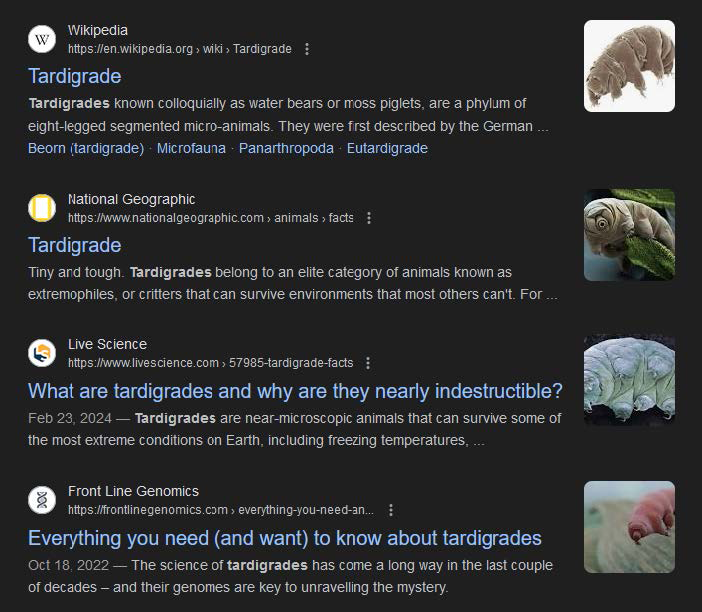
Being aware of what type of sources exist can help you make more informed choices at the start of your research process. As an example, if you search for "tardigrade" in a broad tool like Google, you’ll find a range of results, including images, popular science, news, research articles, and encyclopedia entries (Figure 1).

A screenshot shows the google search results for Tardigrade. The screenshot shows four search results each showing the website, website link, title, and the starting content of the website. The first search result is as follows: Website: Wikipedia. Website link: h t t p s colon double forward slash e n dot Wikipedia dot o r g forward arrow wiki forward arrow Tardigrade. Title: Tardigrade. Starting content: Tardigrades known colloquially as water bears or moss piglets, are a phylum of eight-legged segmented micro-animals. They were first described by the German ellipses. Related articles: Beorn (tardigrade), Microfauna, Panarthropoda, and Eutardigrade. A photograph of a tardigrade against a white background is shown on the right. The second search result is as follows: Website: National Geographic. Website link: h t t p s colon double forward slash w w w dot nationalgeographic dot com forward arrow animals forward arrow facts. Title: Tardigrade Starting content: Tiny and tough. Tardigrades belong to an elite category of animals known as  extremophiles, or critters that can survive environments that most others can't. For ellipses. A photograph of a tardigrade in water is shown on the right. The third search result is as follows: Website: Live Science Website link: h t t p s colon double forward slash w w w dot livescience dot com forward arrow 57985 hyphen tardigrade hyphen facts. Title: What are tardigrades and why are they nearly indestructible? Starting content: Feb 23, 2024 - Tardigrades are near-microscopic animals that can survive some of the most extreme conditions on Earth, including freezing temperatures ellipses. A photograph of the underside of the tardigrade against a black background is shown on the right. The fourth search result is as follows: Website: Front Line Genomics Website link: h t t p s colon double forward slash frontlinegenomics dot com forward arrow everything hyphen you hyphen need hyphen an ellipses. Title: Everything you need (and want) to know about tardigrades. Starting content: Oct 18, 2022 - The science of tardigrades has come a long way in the last couple of decades - and their genomes are key to unravelling the mystery. A photograph of a tardigrade against a blurred background is shown on the right.

Figure 1: Web results for the term "tardigrade"

If all you need is a quick explanation of what tardigrades are (an incredibly tough, adorable microanimal), the encyclopedic Wikipedia article may be the only one of these that you need. If you are interested in an overview of new and interesting research, but you don’t yet have enough background knowledge to read technical articles on the topic, a popular science article in a magazine like National Geographic could be valuable. In short, which source you use will depend on the assignment or question you’re working on and your information need; if you have a sense of what roles different source types fill before you start a search, you can often pinpoint the most useful sources more quickly.
There are many ways to categorize and think about sources. Below are some of the most common ones you’ll encounter as a student.

Academic Sources

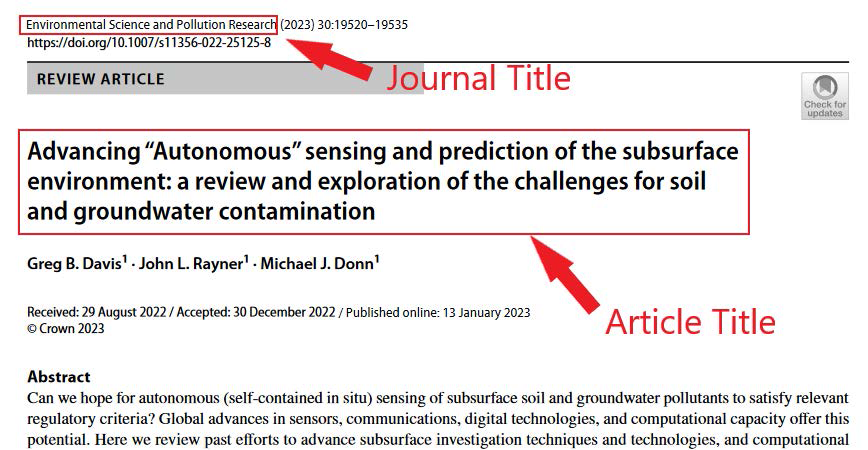
Research articles are typically written by experts in a particular field and are published in academic journals. They usually contain primary research that the author has conducted and are often written with the aim of sharing research in order to contribute to knowledge on a particular topic or in a specific field. It is very common for the audience to be other researchers; however, depending on the discipline and the topic, some research articles may be written to include practitioners who will use the research in their occupation, public audiences interested in the topic, or community members with a role in the research. In order to be published, research articles typically have to go through a process called “peer review” (see Chapter 5 for more information on peer review). Academic journals are collections of research articles and sometimes also other material such as editorials and book reviews. Each journal typically covers a specific disciplinary area or set of subjects. For example, College Composition and Communication publishes scholarship in rhetoric and writing studies. Some journals are more specialized and others have a broader focus. Any given academic research article will be labeled with both the title of the individual article and the title of the journal it was published in (Figure 2).

An academic research article. The article shows the journal title on the top left which reads "Environmental Science and Pollution Research." It is followed by (2023) 30: 19520 - 19535. Below the journal title, the website link is as follows: h t t p s colon double forward slash d o i dot o r g slash 10 dot 1007 forward slash s 11356 hyphen 022 hyphen 25125 hyphen 8. Below the website the side heading on the left reads "Review Article." On the right side a save button icon is present along with the text "Check for updates." The article title below the side heading reads "Advancing double quotation marks Autonomous double quotation marks sensing and prediction of the subsurface environment: a review and exploration of the challenges for soil and groundwater contamination." Below the article title, the author names include Greg B. Davis superscript 1, John L. Rayner superscript 1, and Michael J. Donn superscript 1. The details of the article below include: Received: 29 August 2022 forward slash Accepted: 30 December 2022 forward slash Published online: 13 January 2023. The copyright details are as follows: Copyright Crown 2023. A part of the Abstract given at the bottom is as follows: Can we hope for autonomous (self-contained in situ) sensing of subsurface soil and groundwater pollutants to satisfy relevant regulatory criteria? Global advances in sensors, communications, digital technologies, and computational capacity offer this potential. Here we review past efforts to advance subsurface investigation techniques and technologies, and computational. Journal title and article title are enclosed within red boxes. Note: All the content is left aligned.

Figure 2: Identifying bibliographic information.

Literature reviews typically involve collecting published research on a particular topic and summarizing, synthesizing, and/or analyzing the data. Some literature reviews are published on their own as a way to identify and/or summarize the state of knowledge on a particular topic. Most research articles also contain a brief review of literature that the authors use to show how their research connects to previous research. These smaller literature reviews usually occur toward the beginning of the research article. Literature reviews are often an excellent starting point for your research as they will provide lots of related sources for you to explore.

Dissertations and theses are published research created by graduate students as part of their degree. The terminology used can differ in different places, but in the U.S., a thesis (not to be confused with a “thesis statement”) is typically written as part of an undergraduate degree, honors programs, or master’s degree. A dissertation is typically the final accomplishment of a doctoral degree such as a PhD.

Other types of academic sources include book reviews, editorials, and case studies. Book reviews are typically a brief summary of an academic book that includes its contribution to a specific discipline or topic. Some academic journals also publish material that is not original research, such as editorials written by experts in the field, news, and/or letters to the editor. Case studies are usually focused on a specific person, group, or situation and the context surrounding that case. In fields such as medicine and social work (and many others), case studies are used to help students learn to apply their knowledge to the kinds of complex situations that occur outside of experimental research. In some fields, case study describes a particular methodological approach to research.

Grey Literature

Grey literature refers to sources that are produced outside of commercial or academic publishers. Examples of grey literature include technical specifications, government documents, standards, trade journals, white papers, annual reports, newsletters, patents, and presentations. The organizations that produce grey literature include universities, professional associations, think tanks and research institutes, nonprofits or nongovernmental organizations, and government agencies. The website GreyNet.org is a great resource for more information on grey literature that includes introductory overviews, information about where and how to find grey literature, and material for educators to use in their courses. For grey literature published by government agencies, USA.gov can be a good starting point that will direct you to specific agencies such as the Environmental Protection Agency, Office of Scientific and Technical Information, and more.

Popular Sources

Popular sources are distinguished from academic sources in a few ways. The audience of popular sources is typically broader than that of academic sources. Popular sources are written for a variety of purposes, including information, entertainment, and persuasion. Examples of popular sources include magazines, blogs, podcasts, nonfiction trade books, and social media.

Using science writing as an example, there are many popular sources that report on topics you might also find in academic research, but if you compare the popular sources to the academic ones, you will notice differences. For example, Popular Mechanics is a magazine that focuses on science-related material, but it is written for a general audience rather than an academic audience. An Immense World: How Animal Senses Reveal the Hidden Realms Around Us by Ed Yong is an example of a popular book about science. It includes a bibliography much like an academic book would, but the author is a journalist and the book is categorized by the publisher as a nonfiction “trade” book, meaning that it’s for a general audience. You can often find this kind of information about the type of book from the website of the book or its publisher or from the copyright page of the book. NASA hosts a number of blogs about science, such as blogs sharing news and updates from specific programs or missions and a blog called “Watch the Skies” that shares updates on phenomena visible in the night sky (such as meteor showers). Social media posts on platforms like Facebook, Instagram, X (formerly Twitter), TikTok, and other sites are also considered a popular source.

See Chapter 6 for more information on evaluating the sources you find in your research.

Search Engines, Databases, and AI

Not every tool you type your search question into is the same, and understanding some of the nuances between them will help you to determine which tool is the most effective and efficient one for your search. Many students are used to searching for information on the internet and may find searching Google or other search engines more comfortable and familiar than searching library databases. However, some of the most convenient search tools can obscure relevant information. For example, if you typically search using the address bar of your web browser, your web browser settings are probably linked to a specific search engine. When I open a web browser for the first time on a Windows computer, it lets me know that it will search Bing for the answer by default (you can change this in settings). If you were to search Google for the same question, you would receive a different set of results. In both cases, you may run into paywalls or may not even be presented with sources that haven’t been indexed, or collected, by web search engines.

Search Engines

Google is by far the most popular search engine in the world and has even entered the dictionary as a synonym for searching: English speakers often use “to google” or “googling” as shorthand for “searching the internet.” Google, and other web search engines, crawl through websites created by organizations, individuals, institutions, companies, and more. These sites embed a file that essentially tells those crawlers “look here!” and “take a snapshot!” which is also known as indexing. Once a site is indexed, it can be found in a search engine that is looking through that index for results. This means that there are sites, pages, and information that some or all search engines may not see, either by accident or design.

When a user performs a search in a search engine, it looks through the titles, page names, text, and more of indexed sites and presents ranked results. This ranking system is governed by an algorithm; most search algorithms are proprietary, and the companies that own them only share pieces of how they work. We know Google takes into account the order of the words you’ve used, your current location, your previous searches, similar searches by other users, and more. It also may show sponsored content above actual results. All of this to say, it may not be using the same criteria as you would have to put results in order.

Search engines are often excellent tools for quick, concrete answers. However, for more complex information needs, it can often be more effective to try other tools.

Library Databases

You will often be asked to check library databases for information. At its simplest, a library database is a curated collection of materials such as journal articles, ebooks, media, news articles, and more. Each of these materials were created separately (e.g., a journal publishes individual articles each month) and can be accessed separately (e.g., by going to that journal’s website). However, the database pulls them together in one location, layers search tools over the top, and offers the resulting package to subscribers. Many of the articles in these databases are housed behind paywalls; Michigan Tech pays subscription fees to ensure that faculty, students, and staff have access to this cutting edge research.

Even if you haven’t used a library database in the past, you have used tools that work in the same way! Think back to the last time you watched a show via Netflix, Hulu, or similar. For example, episodes of The Walking Dead were produced by and originally shown on AMC. Later, they were collected by Netflix and provided to subscribers with the addition of Netflix’s search tools layered over the top. This comparison goes further; in some databases you can search the full text of articles, which would be like being able to search the transcript of every show in Netflix. Other databases may only provide abstracts, titles, and similar data, much like Netflix does for a show.

Often library databases are curated based on discipline area or format. Several databases that we find Composition students use regularly for their assignments include:

  • Gale in Context: Opposing Viewpoints—Contextual information, research, and opinions on current social issues.
  • JSTOR—Full-text and scanned images of back issues of many of the core research and academic society published journals. Covering all subjects, but with a strong emphasis in the humanities and social sciences.
  • APA PsycARTICLES—Full-text articles from journals focused on psychology, communication systems, neuroscience, and more.
  • ERIC—Abstracts, records, and some full-text of journal articles related to the education field. Filtering tools allow you to sort by education level (e.g., only view research about college students).

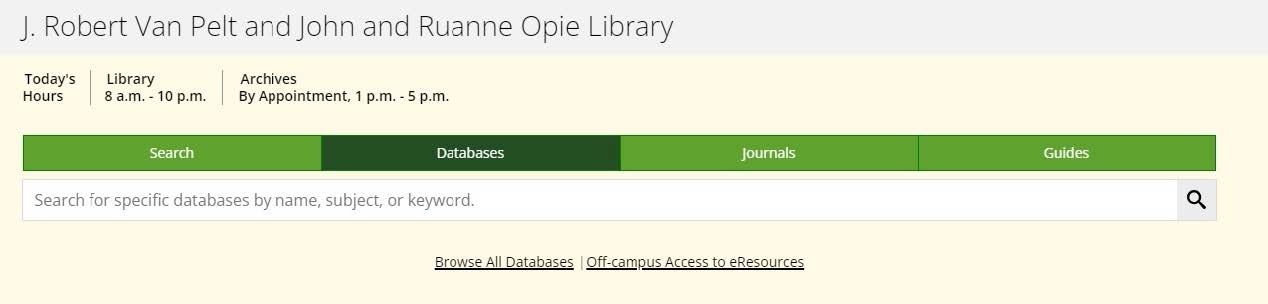
To access the databases that Michigan Tech subscribes to, visit the J.R. Van Pelt and Opie Library website. Select the “Databases” tab under the search bar and either type in the name database you are looking for (a librarian or your instructor can recommend one that fits well with your topic!) or select “Browse All Databases” to explore a full list that’s sorted by subject area (Figure 3).

A screenshot shows the J. Robert Van Pelt and John and Ruanne Opie Library website. The screenshot shows the title "J. Robert Van Pelt and John and Ruanne Opie Library" on the top left. It shows today's hours, library timings, and archives by appointment. The library timings are 8 a.m. to 10 p.m. The appointment time is between 1 p.m. to 5 p.m. Below this four search tabs are present which include search, databases, journals, and guides. Databases is selected. A search bar is present below the tabs which reads "Search for specific databases by name, subject, or keyword." Links for browse all databases and off-campus access to eResources are present at the bottom.

Figure 3: Screen capture of the Michigan Tech library landing page and search bar.

Database Quirks

  • Don’t search your topic under the Databases tab on the library site; instead select one database, open it, and search your topic there.
  • A database is the name of the collected information. Many databases are housed on platforms, and large platforms may host several databases. For example, the platform Proquest hosts both APA PsycInfo, one of the most well-known psychology indexes, and the Materials Science and Engineering Collection. You can search each individually or both together on the platform.

Note that not all databases contain the full text of all resources that they reference. However, the library is typically able to borrow materials from other libraries on your behalf. This service is called Interlibrary Loan, and allows you to receive PDFs of most articles within the day. You can find this service linked throughout the library’s search tool and on mtu.edu/library.

Generative AI

Generative AI (GAI) tools are increasingly making their way into the research workflow in a variety of ways. As they do, it’s important to keep in mind that the hallmark of GAI is that it is predictive. The tool has ingested a huge amount of information and then uses that to predict the next most probable letter/word/phrase/chunk. This means that it can have a lot of trouble getting details correct if you ask it for direct answers; the likely answer may not be the right one or it may not understand enough context to make a quality prediction.

For this reason, GAI is typically not a good tool for finding information because it is not a tool that can assess or sift through information at this time. That said, if you’re having trouble knowing what words to search or how to structure a search, it can often provide lists of synonyms or search strategies that you can then apply in other tools.

Search Strategies

Keyword vs. Natural Language Search

“Hey Siri, is data mining bad?” We use natural language to communicate with each other and search tools every day. Google and other tools employ “Natural Language Processing” algorithms that parse our conversational questions into searchable keywords. For straightforward questions that often have very concrete answers, this works well. However, as the topics you investigate become more complex, there may not be just one answer and you may find that you don’t want a search tool asking “Did you mean…?”

Most library databases are structured differently and are not designed to handle questions written as natural language, and this can make searching them awkward and uncomfortable at first. A search like “is data mining bad” in one of these will give equal weight to the words “is” and “data.” As such, you need to strip unnecessary words out of your search and focus just on keywords, or the most important terms for your search. However, as articles and other sources are added to databases, each field of information—such as the author, title, abstract, etc.—are separated and labeled behind the scenes of the tool. This allows you to search with much more precision by selecting where in a document you want to search.

Google Operators

Google has specific operators (commands that help refine or adjust search results) that anyone can add to their search to make it more precise:

  • Exact Match: Putting quotation marks around a word of phrase will filter results so that they only include exact matches. By default, search algorithms adjust results to account for variations of words, correct for misspellings, and add suggested results. For example, winter carnival will find results about all sorts of carnivals that occur during the winter. However, “winter carnival” will find results with these words together as a phrase. This leads to a much shorter results list with Tech’s annual event appearing near the top of the results.
  • Site Specific: This operator allows you to search a specific website or domain. For example, if you wanted to know what has been published on Michigan Tech’s website about freshwater research, you could search for freshwater microorganisms site:mtu.edu to find material about this any mtu.edu pages. You can make this as broad or as narrow as you’d like:
  • freshwater microorganisms site:.edu will find similar research across other academic institutions that use .edu
  • Freshwater microorganisms site:.edu mtu.edu/greatlakes will find it specifically in the Great Lakes Research Center on campus.
  • Exclusions: Putting a hyphen in front of a word will exclude it from your search. For example, I recently searched for information about identifying fossils and encountered results from a video game called Old School RuneScape (OSRS for short) in which fossil hunting and identification is part of the game. If I wanted to exclude those results from my search, I could search for:
    • Fossil identification -OSRS -RuneScape

In addition to operators, many search engines have settings that can be adjusted to return specific types of results. Google’s “tools,” “Safe Search,” “Advanced Search,” and other settings allow you to search for specific kinds of results (e.g., file types such as images or videos), time periods, languages, locations, or usage rights.

Keep in mind, too, that there are other search engines with different features available, such as Microsoft’s Bing or Duck Duck Go. Depending on the type of computer, phone, or other device you use, your search may automatically use a specific search engine such as Microsoft Bing.

Boolean Operators

Boolean operators are tools that allow you to define the relationship between the keywords you’re using in order to focus, refine, or widen your searches for better results. AND, OR, and NOT are the most common boolean operators, but there are more that you can find described in the "Help" section of any database.

  • AND—using AND will narrow your search results
  • OR—using OR will expand your search results
  • NOT—using NOT will allow you to eliminate irrelevant results

A quick note—when you type keywords without any operators into the library website search bar, the tool automatically assumes you are using AND as your operator.

Let’s try using Boolean operators and see what happens when a different operator is selected. Pretend you’re searching for information about automobiles in America for a research project. When using the Boolean operator AND, the database will search for results that include every word. A simple search string using AND may look like the one below:

Chevrolet AND General Motors

In the library’s search function, this search string produces over 8,000 results. However, you may notice that many of the results are either newspaper articles, or just not what you are looking to use in your project. We can try a different search using OR as our operator. OR is used between words to make sure you find articles that explain the same concept using different language. OR will expand results because it will return information that has one or the other term, or both.

In this instance, Chevrolet is a General Motors product, so we can try searching for both terms in the library’s search bar.

Chevrolet OR General Motors

This search produces over 4 million results! This is obviously too much material to work through. Notice, however, that the search results have the terms Chevrolet or General Motors, or both, highlighted. Perhaps including General Motors is retrieving information that is irrelevant to your search after all. You can exclude General Motors by using the NOT operator:

Chevrolet NOT General Motors

This generates over 51,000 search results. While certainly better than 4 million results, 51,000 is still a lot of material to sift through. Additionally, the results pages only show records with Chevrolet in them and do not include General Motors.

More advanced searching may require the use of Boolean Modifiers, which further refine search queries. Boolean modifiers are parentheses, asterisks, and quotation marks. Several of these are similar to the Google operators, and each one helps to better define the relationship between the keywords or phrases being used in a search query:

  • Parentheses (...) are used to separate OR statements in a search string
  • Quotation marks “...” will produce results matching the wording inside them exactly
  • Asterisks (*) will attach to the root of a word and signal to the database to search for the root AND any letters that follow. For example, produc* would yield results containing product, products, production, produce, producer, and productivity.

Returning to our automobile example, here are a few sample search strings using both Boolean operators and modifiers to try:

  • strike AND (union OR UAW) AND (Chevrolet OR General Motors)
  • “General Motors” AND (UAW OR union) AND strike
  • strike AND (Chevrolet OR “General Motors”) AND produc*

Input these search strings into both the basic search bar on the Library Database’s homepage, and in a few different subject-specific databases listed in the Library Databases A–Z list. Notice the differences between the types of results you get in each search engine as well as the impact of the keywords, operators, and modifiers. If you change a keyword, or remove a modifier from the above search queries, what happens?

Modifying, Filtering, and Narrowing

Users do not need to memorize the operators for either Google or the Library Database. Both search tools have “advanced search” options that allow you to build search strings just like using the operators would. In addition, advanced search menus frequently include additional ways to filter information.

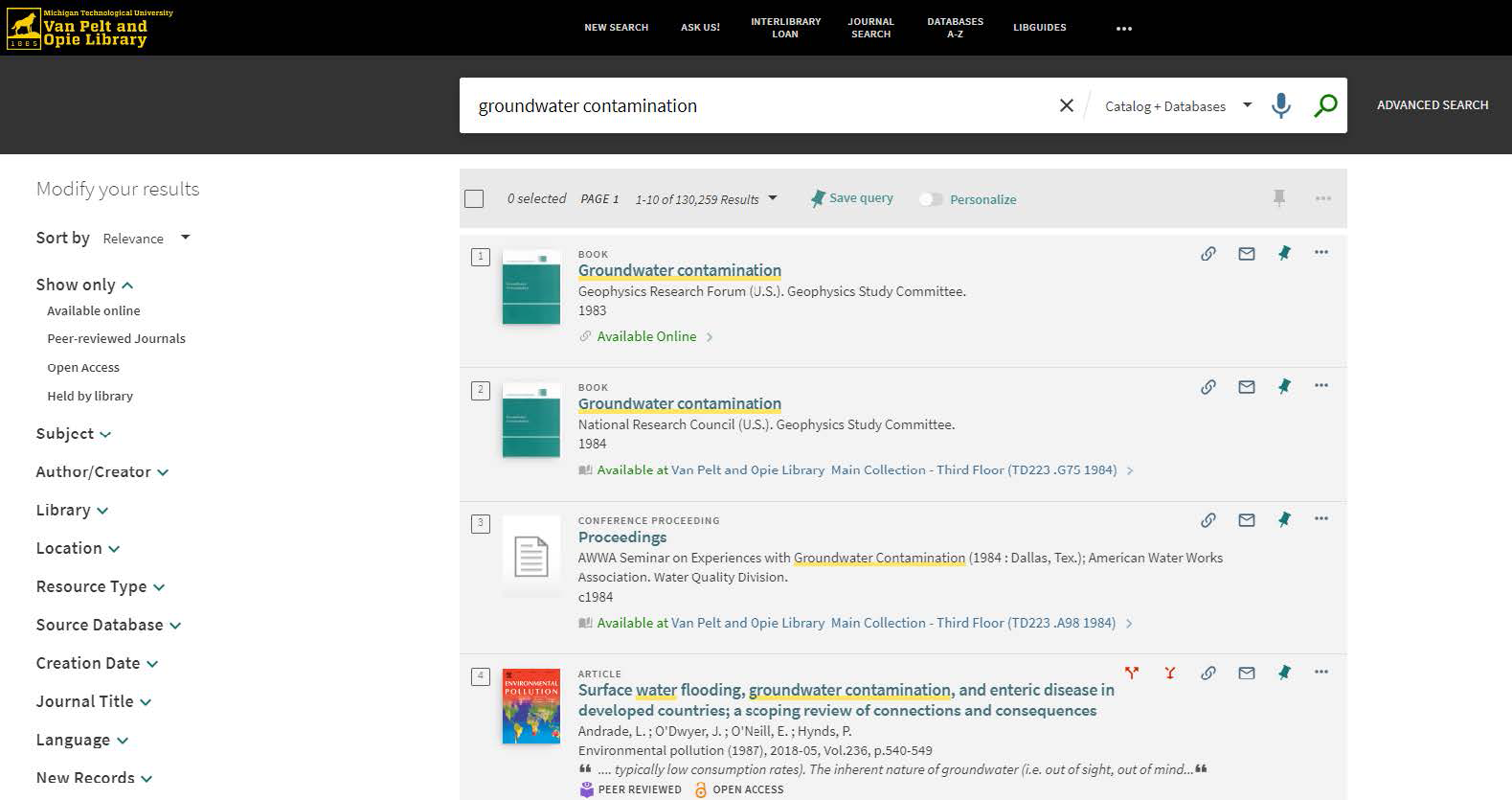
For example, the advanced search of the J.R. Van Pelt and Opie Library website allows you to search specific parts of the library (catalog, databases, course reserves), as well as set filters for specific fields (such as author, title, or call number), material type, language, and date ranges. Once you perform a search, you can also find some of these options in the filter menu on the left side of the results page. The image in Figure 4 shows a full results page after a search.

A screenshot shows the full-page results of an advanced search of the J.R. Van Pelt and Opie Library website. The screenshot shows the logo of "Michigan Technological University, Van Pelt and Opie Library." On the right side of the logo, options include new search, ask us, interlibrary loan, journal search, databases A to Z, and Libguides, A search bar is present below the options. The search bar reads "groundwater contamination" along with a drop-down for catalog plus databases. The search bar also has speech and search icons and an advanced search button on the right. The website shows two panes. The left pane is titled modify your results. It shows options including sort by, show only, subject, author or creator, library, location, resource type, source database, creation date, journal title, language, and new records. Each of these options have drop-downs beside them. For the option sort by, relevance is selected. The option show only has the following sub-options: available online, peer-reviewed journals, open access, and held by library. The right pane shows 4 search results including 2 books, 1 conference proceeding, and 1 article. Each of these has a title, publisher details, year, and availability status. The first search result of the book is as follows: Title: Groundwater contamination. Publisher Details: Geophysics Research Forum (U. S.). Geophysics Study Committee. Year: 1983. Availability: Available online. The second search result of the book is as follows: Title: Groundwater contamination. Publisher Details: National Research Council (U. S.) Geophysics Study Committee. Year: 1984. Availability: Available at Van Pelt and Opie Library Main Collection - Third Floor (T D 223 dot G 75 1984) right arrow. The third search result of the conference proceeding is as follows: Title: Proceedings Publisher details: A W W A Seminar on Experiences with Groundwater Contamination (1984: Dallas, Tex.); American Water Works  Association. Water Quality Division. Year: c 1984. Availability: Available at Van Pelt and Opie Library Main Collection - Third Floor (T D 223 dot A 98 1984) forward arrow. The fourth search result of the article is as follows: Title: Surface water flooding, groundwater contamination, and enteric disease in developed countries; a scoping review of connections and consequences. Publisher details: Andrade, L.; O'Dwyer, J.; O'Neill, E.; Hynds, P. Environmental pollution (1987), 2018 hyphen 05, Vol.236, p.540-549 "ellipses typically low consumption rates). The inherent nature of groundwater (that is out of sight, out of mind ellipses." It is followed by icons for peer reviewed and open access. At the right end of each search result, there are icons for link, mail, pin, and three dots icon.

Figure 4: Results page in the Michigan Tech library database after a search.

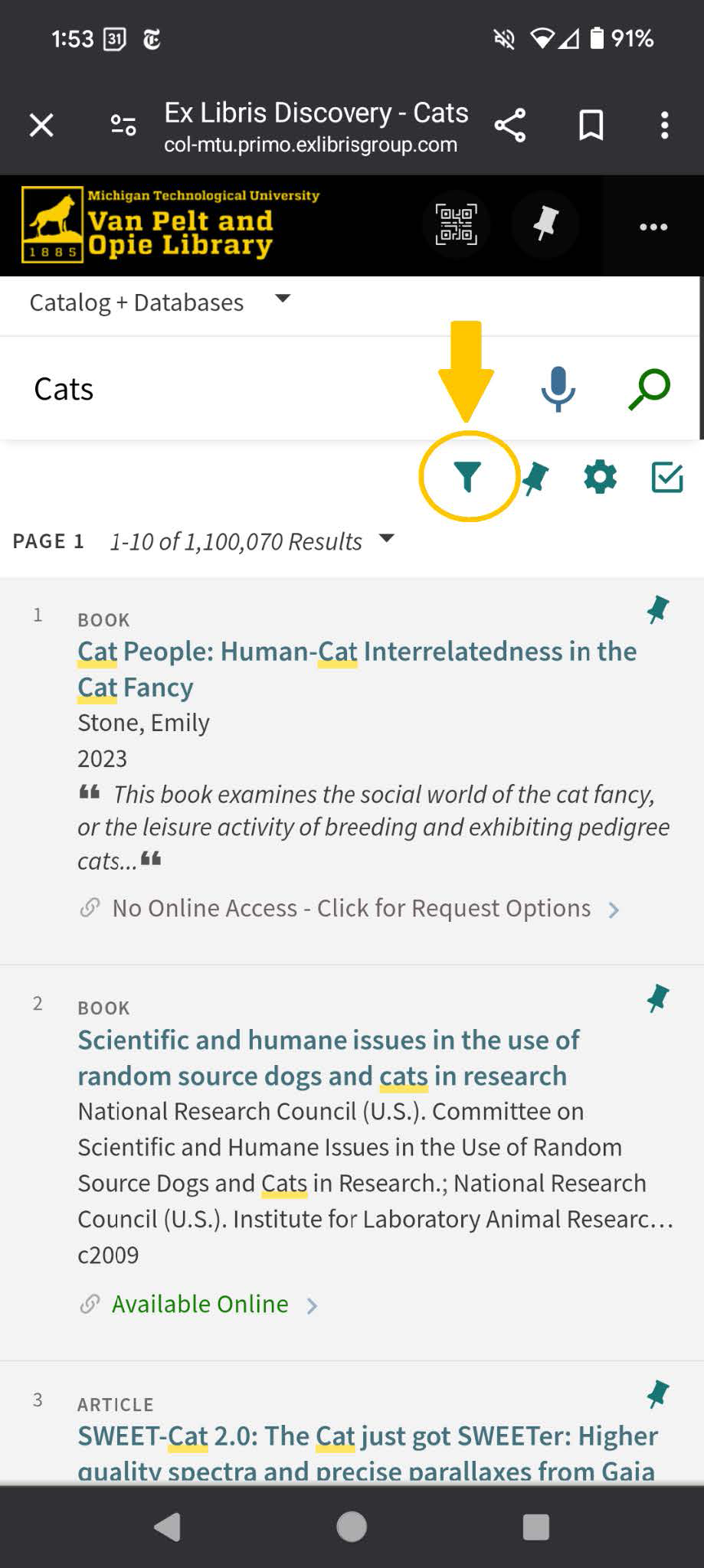
Notice the filtering options along the left while the results are highlighted in the center. If you are using a mobile device, the filtering options will be located under the funnel icon (Figure 5, below). Different databases will have different filters that may be particularly useful in a given field. For example, you can narrow just to "Clinical Trials" in the medical database PubMed or "Secondary Education" in the education database ERIC. Explore the available options in whichever tool you’ve chosen.

Google has similar advanced search options, most of which are accessible from the “Tools” menu at the top of the page showing your search results. Google’s advanced search allows users to input

  • keywords and exact phrases,
  • number ranges,
  • lists of synonyms to include, and
  • lists of words to exclude.

Additional advanced features allow users to narrow the results by language, region, recent updates, site or domain, where the terms appear, file types, and usage rights.

Advanced Strategies

A screenshot shows the advanced strategies of J.R. Van Pelt and Opie Library website. The screenshot shows time, date, network, and battery percentage on the top. Below this the website link reads: Ex Libris Discovery - Cats c o l hyphen m t u dot primo dot exlibrisgroup dot com. Beside the link, share, save, and settings options are present. The screenshot shows the logo of Michigan Technological University Van Pelt and Opie Library followed by a Q R code scan, a pin, and a settings option. A drop-down is present beside catalog plus databases. A search bar with speech and search icons reads cats. Filter, pin, settings, and check options are present below the search bar. The filter option is encircled. The page results show page 1, 1 to 10 of 1,100,070 results. The page shows three search results. The first and second search results show a book while the third shows a part of an article. The first search result is as follows: Title: Cat People: Human-Cat Interrelatedness in the Cat Fancy. Author: Stone, Emily Year: 2023 Book content: "This book examines the social world of the cat fancy, or the leisure activity of breeding and exhibiting pedigree cats ellipses."  Availability: No Online Access hyphen Click for Request Options forward arrow.  The second search result is as follows: Title: Scientific and humane issues in the use of  random source dogs and cats in research. Published by: National Research Council (U.S.). Committee on Scientific and Humane Issues in the Use of Random Source Dogs and Cats in Research.; National Research Council (U.S.). Institute for Laboratory Animal Research ellipses. Year: c 2009.  Availability: Available Online forward arrow.  The third search result is as follows: Title: SWEET hyphen Cat 2 dot 0 colon The Cat just got SWEETer colon Higher quality spectra and precise parallaxes from Gaia. At the right end of each search result a pin icon is shown.

Figure 5: How to find the filter icon on a search results page.

If there is a source that you are working with and you are finding great research material, one method of finding similar sources is called citation mining or citation chaining. Citation mining is done by using the reference list or bibliography of the chosen source. To help narrow down some of your search, you will want to identify the titles, authors, and publication details of the cited works that seem to be most helpful to your research. There are two ways to identify which sources will be helpful:

  1. Look through the reference list and determine which references seem related to your research based on things like title, author, and other publication information.
  2. Or, make a note of the ways that the author of your source is using their sources as you are reading. If the author discusses something that seems relevant to your research, you can make a note of which source they are citing and seek out that source for more information.

Then, you can use the Michigan Tech library database (if the sources are academic) to find the cited sources that seem relevant to your project. Citation chaining is an iterative process that you can continue with the new sources. This is an especially useful strategy if you have one or more academic sources that are a great fit for your project but you’re having trouble finding more. Since academic authors are often experts in the fields in which they publish, this strategy allows you to rely on the author’s expertise to find more relevant sources.

Final Remarks

The library’s search tool can feel a bit unwieldy as you learn to use it. One element that often surprises students is that clicking on the title of a result doesn’t open that article or source. Instead, it opens a window where you then need to scroll down to links listed under “View Online.” These will take you out of the library’s search and into the specific database where the article you want is located. There may be several links in this section—thinking back to the Netflix example above, this would be like a show that can be watched on Netflix or Hulu—you pick which link you prefer! You may also see some sources where the full-text is located in the library; library staff are happy to help you track these down. Finally, if we don’t have a source, you will be prompted to log in to Interlibrary Loan and request it. Please leverage this service—it’s fast and effective!